Most people asking how to make a book already have the hard part sitting on a hard drive. There is a story told at every family dinner, a folder of twelve months of photographs, a method taught fifty times to clients, or a hundred pages written in the evenings. What stops them is the middle: the distance between raw material and an object that has a spine, a page count, and a first chapter that opens on a right hand page.
That distance is made of decisions, not talent. Trim size, page count, margins, binding, cover, and file format all depend on each other, and most of them have to be settled before you write the final chapter. This guide walks the whole chain in the order that works, from the one sentence that defines the project to the proof copy you read before anyone else does. It covers handmade books, printed books and digital ones, because that first choice decides which of the three you are actually building.
The short answer
To make a book: write one sentence naming the reader and what they get, choose the format and rough page count, build an outline where every chapter or spread has a job, draft to a schedule you can keep, add your images, lay out the interior with margins that survive binding, design a cover sized to the final page count, read a proof end to end, then print or publish. The order is the useful part. A layout decision taken at step two saves days of rework at step eight, which is why a project built inside one workspace that carries the outline, the text, the illustrations and the export together usually reaches the proof stage faster than the same book assembled from four unrelated apps.
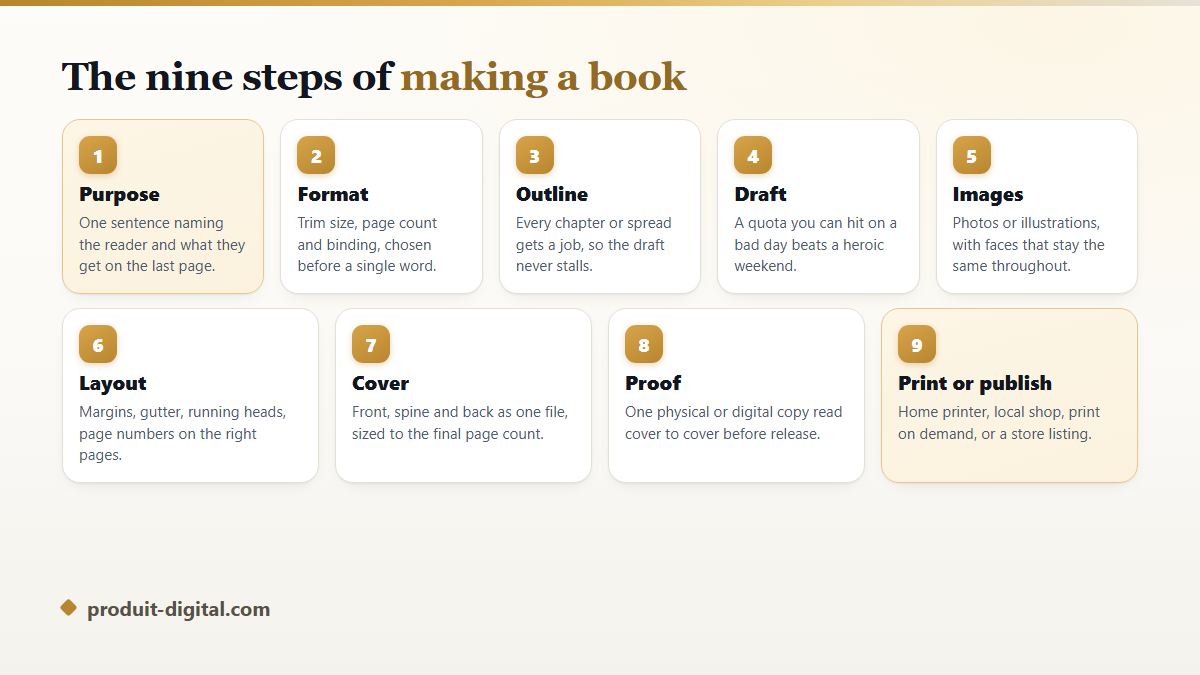
- Purpose: one sentence, one reader, one thing they walk away with.
- Format: trim size, page count, binding, color or black and white.
- Outline: a job for every chapter, every section or every spread.
- Draft: a quota you can hit on a tired evening, not a heroic weekend.
- Images: photographs or illustrations, consistent from first page to last.
- Layout: margins, gutter, running heads, folios, chapter openers.
- Cover: front, spine and back as one file, built after the page count is final.
- Proof: one full read of the real thing, on paper or on a device.
- Print or publish: home printer, local shop, print on demand, or a store listing.
Step 1. Say what the book is, in one sentence
Before any software opens, write a single line: this book gives a named reader a named thing. Claire, who photographed her daughter through a first year, wrote hers as one clear page per month so nobody has to scroll a phone to remember. That sentence settled her page count, her paper choice, and the fact that she wanted three copies rather than a listing on a store.
The sentence then works as a filter you will use forty times. Every chapter you consider, every photograph you hesitate over, every extra section that feels tempting gets held against it. Material that does not serve the sentence goes into a folder named later and stops slowing you down.
Books stall for a boring reason: nothing tells the author when to stop. The promise written on day one is the finish line. Without it, the project grows quietly until it feels too heavy to carry, and the folder sits untouched for a year.
Step 2. Choose the format before you write a word
Format is the decision people postpone and then pay for twice. Trim size, page count, binding and color all pull on each other. A saddle stitched booklet needs a page count that divides by four. Art that runs to the paper edge needs bleed, which means the artwork has to be built larger than the page from the start. Color interiors are priced differently from black and white ones at every printer, so a book of photographs and a paperback of plain text are not the same project even at the same length.
The common trims exist for good reasons. A 6 by 9 inch page suits novels and non fiction. An 8.5 by 11 inch page suits workbooks, manuals and anything with exercises to fill in. Square trims around 8 by 8 inches suit children's books and photo books, because a square spread frames an image without forcing an ugly crop. Take one from your printer's published list instead of inventing your own, since a custom trim quietly removes options later.
Page count follows from the format. For a text book at a 6 by 9 trim, a rough guide is around 250 to 300 words per page, so a 60,000 word manuscript lands near 220 pages once front matter is added. For an illustrated book, count spreads rather than words. Either way you need the number early, because the spine width of your cover is calculated from the page count and the paper thickness.
Four ways to make a book, and how to pick one
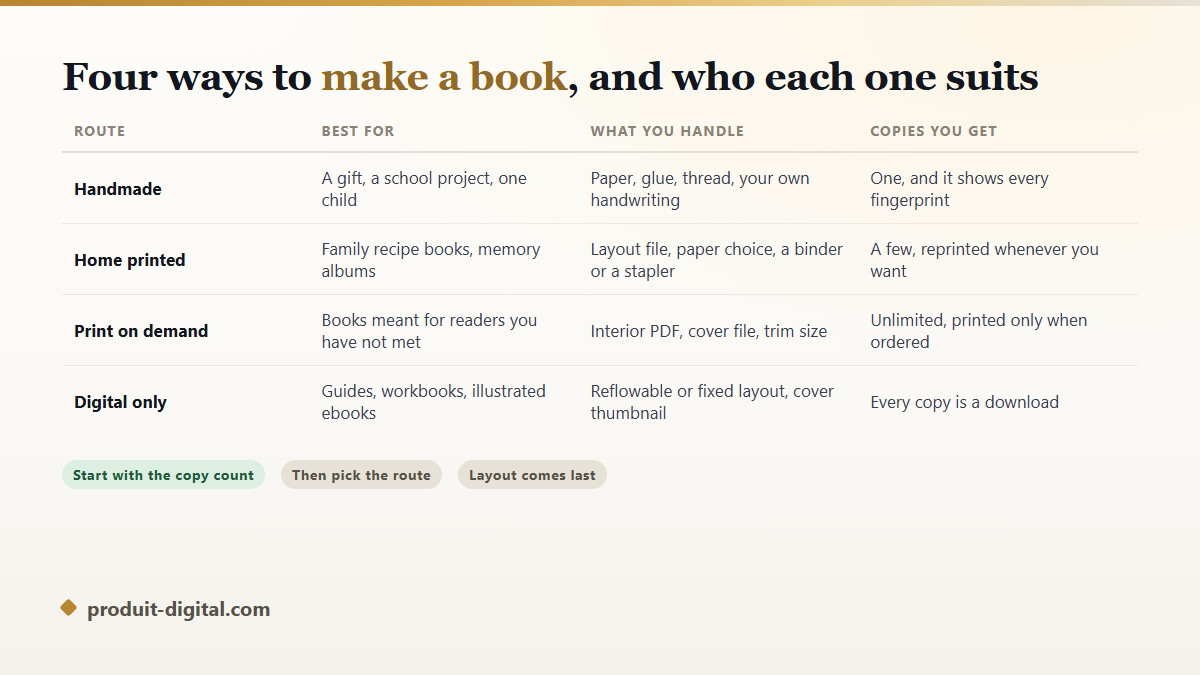
Ask how many copies you need and who will read them. One copy for one person is a different craft from a title you hope strangers will buy. Claire's photo album and Julien's client workbook use the same nine steps, but they diverge completely at production.
A handmade book is stitched, glued or bound by hand. It suits gifts, school projects and anything where the object itself is the message. Home printing suits family recipe collections and albums where a few copies are enough. Print on demand suits books meant for readers you have never met, since a copy is manufactured only when someone orders it. Digital only suits guides, workbooks and illustrated ebooks, where every copy is a download and updates cost nothing to distribute. A memory book built around photographs and short captions can go down any of the four routes, and the choice changes almost nothing about the writing.
Step 3. Outline so the draft never stalls
An outline is not a table of contents. A table of contents lists titles. An outline gives each chapter a job: what the reader knows before it, what they know after it, and the one example or scene that carries the change. Written that way, an outline is a plan you can hand to someone else.
For an illustrated book, outline in spreads rather than chapters. Draw a grid of small rectangles, two per spread, and write one line in each: what happens, what the picture shows, how many words fit. A 32 page picture book is a fixed container, and the outline is where you discover that your story needs 40 pages before you have drawn anything.
Test the outline by reading only the chapter jobs, in order, out loud. If the sequence makes sense as a summary, the book will make sense as a book. If two chapters have the same job, merge them now, while merging costs ten minutes instead of a week.
Step 4. Draft on a quota you can keep
Drafting fails on ambition. A quota of 2,000 words a day works until the first bad week, then the guilt does more damage than the missed words. A quota of 400 words survives a head cold, a late meeting and a sick child, and 400 words a day is a full manuscript inside six months.
Track it somewhere visible. A paper calendar with a cross on each day you wrote is enough, and it is more honest than a word processor's statistics. What you are protecting is the chain, not the daily total.
Do not edit while drafting. Fixing sentences in a chapter you may cut is the most expensive habit in book making. Leave a bracketed note where a fact needs checking, keep moving, and gather all the checks into one research pass afterward. Writers who want the full method for that stage will find the drafting and revision passes covered in more depth in our guide on taking a book from a first idea through to a final page.
Step 5. Images that hold together from page one to the last
Images make or break an illustrated book, and the failure is almost never quality. It is consistency. A child hero with brown eyes on page four and green eyes on page nine reads as a different child, and young readers notice it before adults do. The same trap catches photo books: mixing warm indoor shots with cold outdoor ones on facing pages makes the spread look like two books glued together.
For photographs, work in one color treatment across the whole book, and crop to a single set of shapes rather than a new shape per page. For drawings, build a small reference sheet first: the character from the front, from the side, and doing one typical action. Every later illustration is drawn against that sheet.
Generated illustration has the same rule, which is why our platform treats the hero as a fixed reference rather than a fresh prompt each time. If your book follows one person or one animal across every page, the feature for keeping the same face, clothes and proportions on every illustration is the part that separates a book from a set of pretty unrelated pictures.
Step 6. Lay out the interior
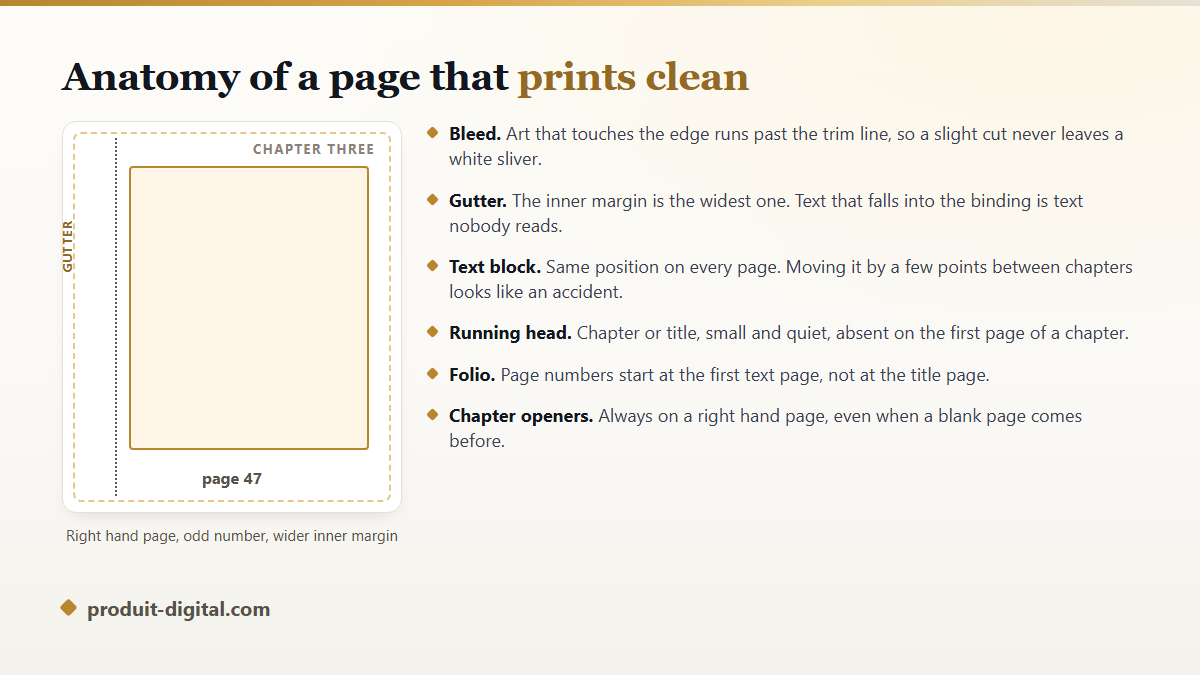
Layout is where amateur books show themselves, and the fixes are mechanical. Give the inner margin, called the gutter, more room than the outer one, because binding steals a few millimeters of every page. Keep the text block in exactly the same position on every page. Start each chapter on a right hand page, adding a blank left page when needed, since that blank page is a convention rather than a mistake.
Page numbers, called folios, start at the first page of real content, not at the title page. Front matter uses lowercase roman numerals when it is numbered at all. Running heads carry the book title on one side and the chapter title on the other, set small enough that the eye skips them.
Two habits prevent most reprints. Turn on hyphenation and check for rivers of white space in justified text, then read the last line of every paragraph looking for a single word stranded alone. Both are invisible on screen and obvious on paper.
Step 7. Build the cover as one single file
A print cover is not a front image. It is one flat file containing back cover, spine and front cover in that order, left to right, plus bleed on all four edges. The spine width comes from your final page count multiplied by the paper thickness your printer publishes, which is why the cover is built last.
Design for the smallest size it will ever appear at. On a store listing your cover is a thumbnail the size of a stamp, and a title in a delicate script disappears completely. Set the title large, keep the author name readable, and check the whole thing shrunk down on a phone before you commit.
The back cover carries a short description, a line about you, and space for a barcode if the book will be sold in shops. Leave that space empty and pale, because printers place the barcode there and a dark background makes it unscannable.
Step 8. Proof before anyone else reads it
Order or export one proof and read it the way a reader would, front to back, without a pen for the first pass. Errors that hid through twenty screen readings become loud on paper: a chapter opening on the wrong side, a photograph reproduced too dark, a page number missing from a full bleed spread.
Read the second pass with a pen and a list. Check the table of contents against the real page numbers, check that every image has the caption you meant, check the copyright page, and check the spelling of every name that belongs to a real person. A misspelled grandmother is the one error nobody forgives.
Step 9. Print, publish, or do both
Home printing gives you control and immediate copies. Use the heaviest paper your printer accepts, print double sided in one run so the alignment stays constant, and bind with a comb, a spiral or a simple stitch. For a keepsake, a local print shop will do a better job than a home machine at a small extra step of effort.
Print on demand puts your interior PDF and cover file into a system that manufactures a copy per order, which removes stock and shipping from your problem list. Each service publishes its own specification for trim sizes, bleed and file type, and according to Amazon KDP's documentation a print interior has to be supplied as a PDF with fonts embedded. Read the specification before you build, not after a rejected upload.
Digital publishing is the fastest route and the one most people underestimate. A well made PDF sells directly from your own page, while a reflowable file reaches ereaders. Many authors do both: a digital edition on release day, a printed edition once the text has settled. Our overview of what the platform builds, from interior pages through to the final export shows which pieces of that chain you can keep in one place.
How do I make a book if I have never made one before?
Make a small one first. The instinct is to begin with the big project, and the big project is the worst teacher because every mistake costs weeks. A 16 page booklet about something you already know teaches you trim sizes, margins, bleed, cover files and proofing in a single weekend, and the lessons transfer completely.
Julien, a swimming coach, made a 20 page warm up guide for his club before he touched the training manual he had been planning for years. The booklet taught him that his photographs were too dark for print and that his chapter titles were too long for a running head. Both problems would have cost far more in a 200 page book.
Pick a first project with a real reader waiting for it. A first year album put together for one family has a natural deadline and an audience of people who will be delighted regardless of your kerning, which is exactly the low stakes practice a first book needs.
Six mistakes that force a reprint
- Choosing the trim size after the layout is finished, which rescales every image and breaks every page break.
- Building a cover before the page count is final, so the spine text sits off center on the printed copy.
- Placing text or faces too close to the trim edge, where the cutting blade takes them.
- Using images pulled from a screen rather than a camera, which look sharp on a monitor and soft on paper.
- Forgetting the copyright page, the title page, or the blank pages that make chapters open on the right.
- Approving a proof from a screenshot instead of reading the physical copy end to end.
Every item on that list is cheap to prevent and expensive to fix. Five of the six are settled by taking the format decision seriously at step two, which is the argument for doing the boring part first.
Frequently asked questions
How long does it take to make a book?
A short illustrated book or a photo album is a matter of days once the material is gathered. A full length manuscript is measured in months, and the drafting is the long part. Production, meaning layout, cover and proofing, takes about two weeks of evenings for a first attempt and a couple of days once you have done it before.
Do I need special software to make a book?
No. A word processor with proper styles, mirrored margins and a PDF export handles a text book perfectly well. Dedicated layout software earns its place on illustrated books, where images and text have to sit together precisely. What matters is that the tool exports a print ready PDF with embedded fonts, since that is the file every printer asks for.
How many pages should my book have?
Let the content decide, then adjust to your binding. Perfect binding needs enough pages for a spine to exist at all, roughly 24 or more depending on paper. Saddle stitch needs a multiple of four. Children's picture books are traditionally 24, 32 or 40 pages because of how printing sheets fold, and staying on those numbers keeps printing straightforward.
Can I make a book with no writing experience?
Yes, and photo books, recipe collections and memory albums are the usual entry point because the images carry the story. Your writing job shrinks to short captions and section introductions, which is a far gentler start than a novel. The craft you learn on that first book is production craft, and it is the part that transfers to everything else.
What file does a printer actually want?
For the interior, a PDF with every font embedded and images at printing resolution rather than screen resolution. For the cover, a second PDF built to the exact template your printer generates from your page count and paper. Send anything else and the upload is rejected or, worse, accepted and printed wrong. Generate the cover template only after the interior is final, since one added page changes the spine.
Where to start this week
Open a blank page and write the one sentence from step one. Then decide the format, and the rest of the chain becomes a series of small decisions instead of one large fog. If you want the outline, the writing, the illustrations, the layout and the export to live in the same place rather than in four files you keep converting, create your free account and build the first sixteen pages this weekend. A small finished book teaches more than a large unfinished one.