Nobody sees your ebook cover the way you see it. You look at it filling half a laptop screen, for as long as you like. A shopper sees it about 150 pixels wide, in a grid with thirty nine other books, for roughly a second, while scrolling with a thumb. Every design decision has to earn its place under those conditions, and most covers that fail do so because they were judged at the wrong size.
Claire spent two weeks on hers. Delicate script title, a photograph with beautiful detail in the background, a subtitle explaining the premise, and a small quote from a friend who had read the draft. At full size it was genuinely lovely. In the store grid it was a gray rectangle with an unreadable smudge across the middle, and it converted like one.
The short answer
Design at 1600 pixels wide by 2560 tall, in RGB, and save as a high quality JPEG. Give the cover one large focal element, a title in heavy type that stays readable when the image is 100 pixels across, and colors that separate it from the books it will sit beside. Cut anything that only works at full size. Then shrink the file to thumbnail width, look at it from two meters away, and fix whatever you can no longer identify. If the book behind the cover is still in progress, the full route from manuscript to a finished ebook file walks through the stages that surround this one.
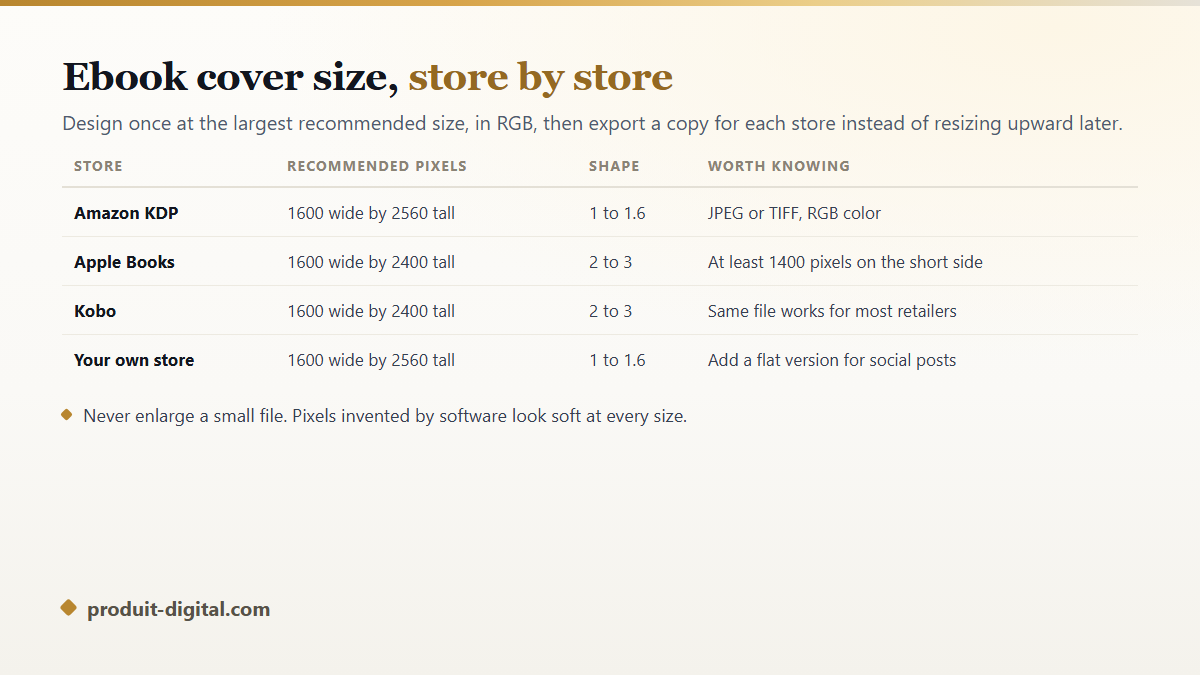
Ebook cover size: what each store expects
According to Amazon KDP's documentation, the recommended ebook cover size is 1600 pixels wide by 2560 pixels tall, an aspect ratio of 1 to 1.6, supplied as a JPEG or TIFF file in RGB color. KDP's help pages also set a floor of 1000 pixels on the longest side and reject files above 50 MB. Apple Books asks for at least 1400 pixels on the shorter side, and Kobo recommends 1600 by 2400, which is the slightly taller 2 to 3 shape used by most of the industry outside Amazon.
Work at the largest recommended size from the beginning and export smaller copies from it. Enlarging a small file never adds detail: the software invents pixels, and the result looks soft at every size, most visibly in the title. Keep the layered original too, because you will want to change the subtitle or add a series line later, and rebuilding a flattened image from scratch takes longer than the first attempt did.
The thumbnail test, and how to run it properly
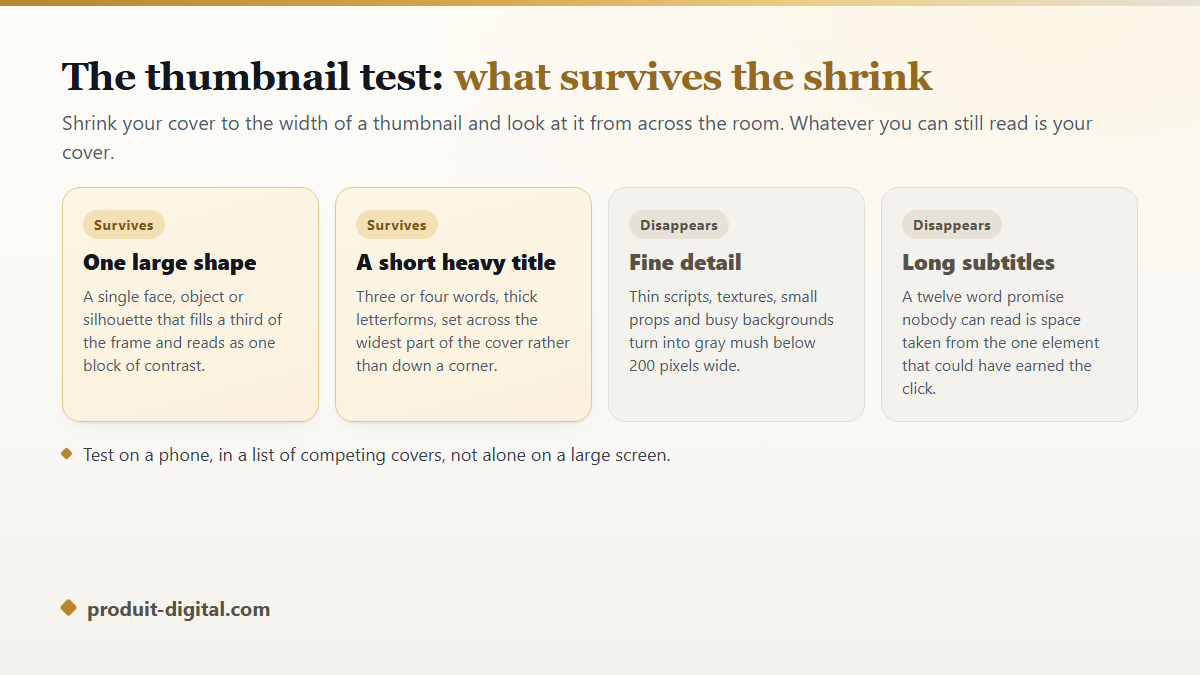
Export your cover at about 150 pixels wide, drop it into a folder next to five bestsellers in your category, and look at the row from across the room. This takes two minutes and tells you more than a week of adjustment at full size. What you are checking is simple: can you tell what kind of book it is, and can you read the title.
Fine detail is the first casualty. Thin script fonts, textures, small background props and photographs with a lot going on all collapse into gray noise below 200 pixels. What survives is contrast and mass: one large shape, one heavy title, two or three colors doing clear work. That is why so many strong covers in a store grid look almost crude when you open them at full resolution.
Genre before beauty
A cover has one job before it has any other: telling a browsing reader what kind of book this is. Readers of thrillers, cozy mysteries, romance, business nonfiction and epic fantasy each recognize a visual language, and they filter by it faster than they read. A cover that ignores its category looks original to the author and looks like a mistake to the audience.
Study the top forty books in the exact category you intend to publish in, not the genre in general. Note the color range, whether titles sit at the top or the bottom, whether people appear, and how much of the frame the subject fills. You are looking for the pattern to work inside, not a cover to copy. Distinctiveness comes from the image and the palette, while the structure stays familiar enough that the right reader stops scrolling.
The five parts of a cover, ranked
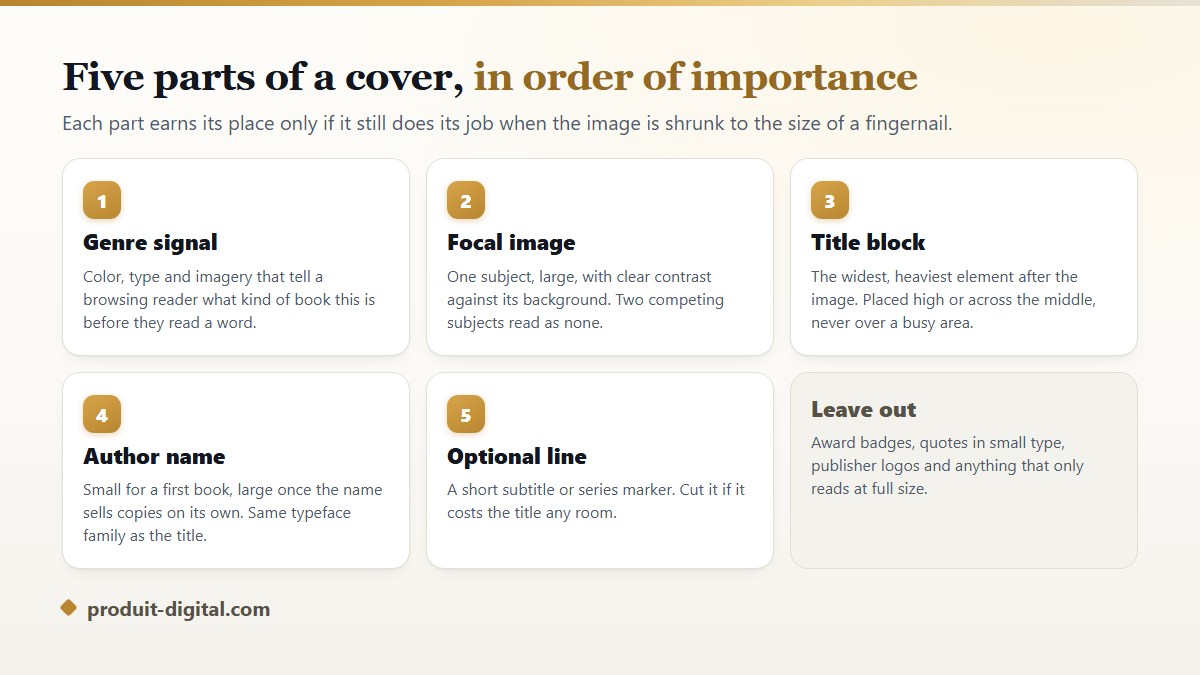
Everything on the front competes for the same small space, so it helps to know the order in which things get cut when the space runs out.
- The genre signal: color, type style and imagery that place the book in a second.
- The focal image: one subject, large, clearly separated from its background.
- The title: the heaviest text, wide across the cover, never sitting on a busy area.
- The author name: modest for a first book, larger once the name sells copies on its own.
- An optional subtitle or series line, kept short, cut entirely if it steals room from the title.
- Nothing else. Award badges, small quotes and logos are invisible at thumbnail size and clutter at full size.
Typography that holds at any size
Set the title in a face with real weight and open letterforms. Condensed fonts fit more characters and become unreadable first; thin fonts vanish against a photograph; scripts are legible only if the words are short and the size is generous. Two type families is the practical limit, and using one family in two weights is often cleaner still.
Contrast decides legibility more than the typeface does. Light text on a light photograph fails even at full size, and no outline or drop shadow rescues it. Darken the area under the title, add a solid band, or move the text somewhere the background is quiet. A quick check is to view the cover in grayscale: if the title stops separating from the image, the contrast was doing less work than the color suggested.
Making the cover yourself: tools and trade-offs
An online ebook cover creator gives you a canvas at the right pixel size, a font library and a stock image search in one place, which removes the two most common beginner errors: wrong dimensions and low resolution artwork. Amazon builds one of them into its own paperback setup screen, searching for a free ebook cover maker online turns up plenty more, and the honest limitation is shared by all: template based results look like template based results, and readers in a competitive category notice.
Hiring a designer buys judgment as much as execution, especially for a series where five covers have to look related without looking identical. Doing it yourself buys iteration, which matters more than most authors expect, because you rarely get the cover right on the first try and paid revisions make experimenting expensive. Younger writers publishing serially online face a slightly different version of the same problem, covered in the guide to making a cover that earns a tap on a serial fiction platform.
On Produit Digital the cover is generated from the book itself, so the title, the subject and the visual world of the story come from what you have already written rather than from a stock search. The page that shows how a cover gets built from your book explains the steps, and you can produce several directions and compare them at thumbnail size before choosing. The rest of the production chain, from writing to a file ready for the stores, sits on the overview of what the platform makes for a book.
How the cover connects to the rest of the file
Inside an EPUB the cover is both the first page and the image the library grid displays, so it has to be embedded correctly as well as uploaded to the store. A book that shows a blank placeholder in a reader's library has usually failed at that step rather than at the design. The interior settings that decide how the rest of the file behaves are covered in the guide to the layout choices that make a file comfortable to read on any device.
If you plan a print edition as well, the ebook cover is only the front. Print needs a full wrap with a back cover and a spine whose width depends on the page count and the paper, which means the file cannot be built until the interior is final. The routes available for that, and what each one demands, are compared in the rundown of every way a book can reach readers.
Mistakes that cost sales quietly
The expensive errors are rarely ugly. A cover can be tasteful and still fail because the title is unreadable small, because the palette matches a different genre, or because the image is a stock photograph three other books in the category are already using. Reverse image searching your main artwork before publishing takes a minute and occasionally saves an embarrassment.
Rights are the other quiet problem. A photograph or illustration needs a license that covers commercial use on a book cover, and free image sites vary in what they permit. Keep proof of the license with the source file. If the artwork was generated rather than photographed, check the terms of the tool that produced it, since they differ and they change.
Frequently asked questions
What is the best ebook cover size to design at?
1600 pixels wide by 2560 tall covers Amazon and works nearly everywhere else after a small export. If you also sell on stores that prefer a 2 to 3 shape, build at 1600 by 2560 with a little breathing room around the edges so a 1600 by 2400 crop does not clip the title.
Can I use a free ebook cover maker and still look professional?
Yes, if you treat the template as a starting structure rather than a finished design. Replace the stock image, change the type, and adjust the palette so the result does not match five other books on the same shelf. The tool is rarely what gives a cover away, but an untouched template always is.
Should the subtitle appear on the cover?
For nonfiction, usually yes, because the subtitle carries the promise that sells the book. For fiction, usually no. Either way it should be short enough to read at thumbnail size, which in practice means about six words, and it should never be given more room than the title.
How different should a series look from book to book?
Same structure, same type treatment, same palette family, different focal image and a clear volume number. Readers should recognize book four as belonging to the set from across a store grid, then be able to tell instantly which one they have not read yet.
Does the cover need to match the print edition exactly?
The front should match, so a reader who saw one recognizes the other. The files themselves differ: print needs a full wrap in CMYK with bleed and a spine sized to the page count, while the digital version is a single RGB image. Build the digital front first, then extend it once the interior page count is final.
Is it worth redesigning a cover after publishing?
Often, yes. Covers are the cheapest variable to test on a book that is selling below expectations, and stores let you replace the file without republishing the text. Change one thing at a time and give each version enough weeks to produce a readable signal.
Build it, shrink it, then decide
Design at the full size, judge at thumbnail size, and let the category tell you what the shape of the cover should be before your taste tells you anything. Test with real covers beside yours rather than alone, because that is the only context a shopper will ever see it in. When you want the cover built from the book you actually wrote instead of from a template library, you can create your account and generate several cover directions from your own manuscript and compare them small before you commit to one.