Almost everyone who searches for how to sell books on Amazon expects the hard part to be the upload. It is not. Creating a Kindle Direct Publishing account and pushing a file through the form takes an evening, and thousands of people do it every day. The book then lands in a store holding millions of titles, on a page nobody has any reason to visit, and the silence that follows is what actually needs solving.
This guide covers the whole route: the three different ways a book can end up for sale on Amazon, what has to be finished before you touch the dashboard, how a listing is built so that readers meet it, how the money is calculated, and what to do during the first month while the store is still deciding what your book is. If you have not chosen between self-publishing and a traditional deal yet, the full comparison of every publishing route open to an author is the decision that comes before this one.
How to sell books on Amazon: the short answer
Finish the book and its cover, open a free KDP account, complete the tax interview, upload the interior and cover files, choose three categories and seven keywords, set a price and publish. Amazon lists the title within about seventy two hours according to its own documentation, prints paperbacks only when they are ordered, and pays royalties monthly. Everything that follows publication, the listing text, the reviews and the categories, is what decides whether the book sells more than a handful of copies.
The three routes that put a book on Amazon
Most authors only ever hear about Kindle Direct Publishing, and for a first book it is usually the right answer. Two other routes exist, and knowing they exist prevents a common trap: publishing through one channel, then discovering the second one would have suited the format better and having to unpublish. Unpublishing is possible, but a title that disappears and returns loses its reviews history and its ranking, so the cost of choosing badly is paid later rather than at signup.
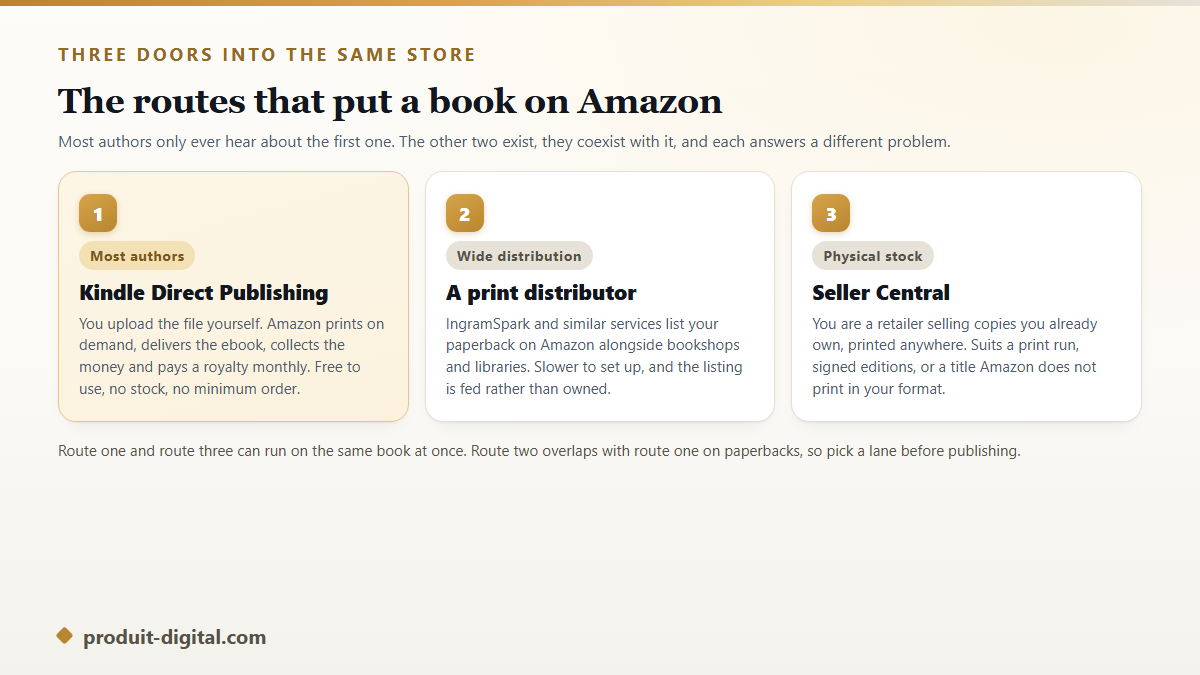
Kindle Direct Publishing handles ebooks, paperbacks and hardcovers, prints on demand, and costs nothing to use. A print distributor such as IngramSpark places your paperback on Amazon alongside bookshops and libraries, which matters if physical retail is part of your plan. Seller Central makes you a third party retailer selling copies you already own, which is the route for a print run, signed editions, or a format Amazon does not produce. The routes that reach Amazon buyers outside Kindle Direct Publishing go through the second and third options in detail.
What Kindle Direct Publishing actually gives you
KDP is Amazon's own self publishing service, free to join and open to authors in most countries. It hosts the ebook file, prints the paper editions when a customer orders one, takes the payment, handles returns, deals with tax collection in the marketplaces where Amazon acts as the seller, and reports your sales in a dashboard. You supply the files, the metadata and the price.
What it does not give you is promotion. Amazon will show your book to people who search for it by name or who browse deep into a category, and that is roughly the extent of the free help. The store's recommendation engine reacts to sales rather than causing them, which is why the first buyers have to come from you. A full walkthrough of how Kindle Direct Publishing works from the inside covers the dashboard screen by screen if you want the mechanics before the strategy.
What has to be finished before you open the dashboard
Sellers who stall at publication usually arrive with three of the four items below and try to improvise the fourth inside the upload form at midnight. Prepare all four in advance and the publishing session takes under an hour.
- A proofread interior file. DOCX or EPUB for the ebook, a print ready PDF for paper editions, with the trim size decided before layout rather than after.
- A cover that survives a thumbnail. Judge it at the size of a postage stamp, because that is the size at which readers decide. Paper editions need a full wrap with spine width matched to the page count.
- A description written as a pitch. Not a summary of the plot. The first two lines are the only ones most visitors read before the fold.
- Your tax and bank details. The KDP tax interview and a bank account able to receive the payment currency, because publishing stops dead without both.
Setting up the account and the paperwork
Account creation is unremarkable, and the tax interview is the step that surprises people. KDP asks for tax identification through an online interview before it will pay anyone, and the form differs depending on whether you are in the United States or elsewhere. Authors outside the US who complete it correctly, and whose country holds a tax treaty with the US, generally have a reduced withholding rate applied on their royalties. Doing it before publication rather than after saves a month of held payments.
The other early decision is the ISBN. Ebooks sold on Amazon are identified by an ASIN and need no ISBN at all. Paperbacks and hardcovers do need one, and KDP offers a free ISBN that can only be used with Amazon's print service. Buying your own leaves you free to reprint the same edition elsewhere later, which matters if wide distribution is in your plans. The setup path from a blank KDP account to a first royalty payment walks through each form field in order.
Building a listing readers actually meet
The book page is the whole shop. A reader who reaches it has already been sorted by search or by a browse category, and every element on the page is doing a specific job during a very short visit. Treating the listing as paperwork is the single most expensive habit in self publishing.
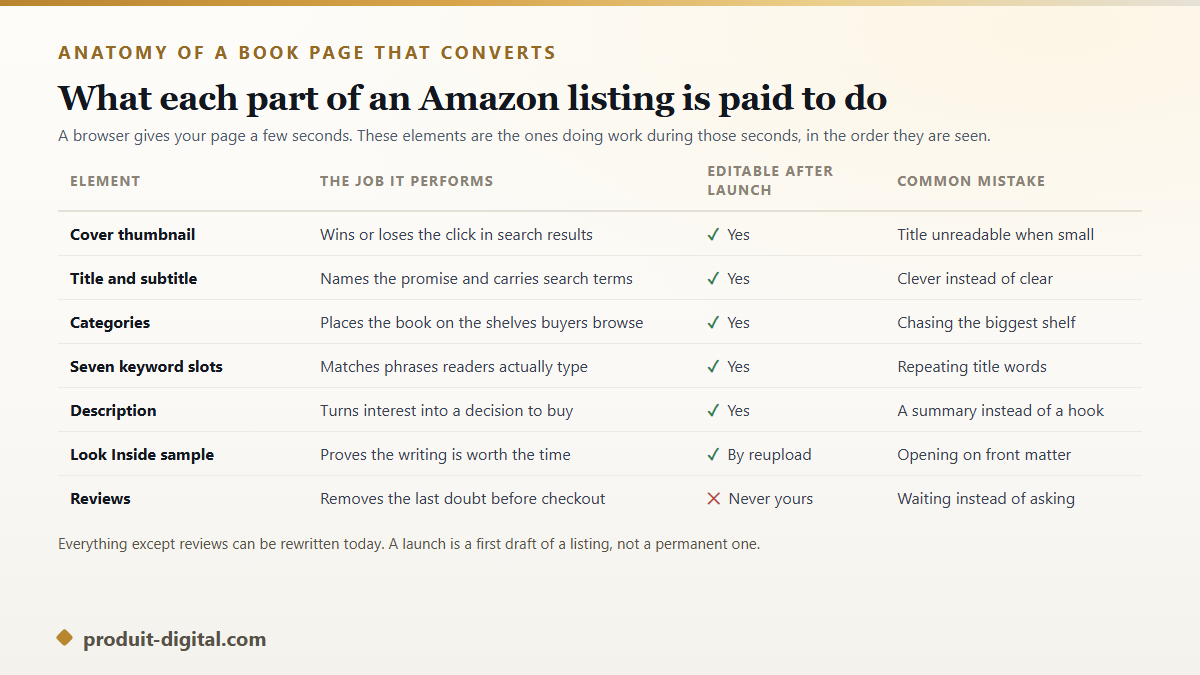
Work through that page in the order a buyer experiences it. The cover wins the click, so it is judged in search results rather than on your screen. The title and subtitle name the promise. The description sells, which means it opens on the reader's problem rather than on your writing journey. The sample proves the writing, so a book that opens with three pages of front matter is wasting the only free trial Amazon offers.
Categories and keywords: how readers find the book
KDP gives you three categories and seven keyword fields. The categories place the book on browsable shelves and generate the bestseller rankings authors care about. The keyword fields feed Amazon's search, and they work best when filled with phrases a reader might type rather than adjectives about your book. Repeating words already present in the title wastes a slot, since the title is indexed anyway.
The instinct to pick the biggest possible category costs sales. A book ranked far down a huge shelf is invisible, while the same book near the top of a precise subcategory appears in the browse lists Amazon builds automatically. Precision also brings readers who wanted exactly this book, which shows up later in ratings. Choosing categories and keyword slots that put a book in front of real buyers covers the research method in full.
Pricing and royalties without guesswork
Amazon's royalty structure is public and worth understanding before you set a price. According to KDP's documentation, ebooks earn either a 35 percent or a 70 percent royalty rate, and the higher rate applies only inside a defined list price range, in specific marketplaces, with a delivery cost based on file size deducted from each sale. Paper editions pay 60 percent of the list price in most marketplaces after the printing cost is subtracted, and Expanded Distribution pays 40 percent on the same basis.
Two consequences follow. An illustrated ebook with heavy image files can earn noticeably less per sale than a plain text one at the same price, so compressing images is money rather than housekeeping. And a paperback priced too close to its printing cost can earn almost nothing, which is why page count and trim size are commercial decisions taken during layout. How KDP royalties are calculated, with worked examples shows the arithmetic on real cases.
Selling books on Amazon after the publish button
Publication is the start of the work that matters, and most of what people mean by how to sell books on Amazon happens after it. The store surfaces titles that are already moving, so early sales buy visibility that later sales cannot easily replace. This is not a mystery to be solved with tricks: the people who will buy in week one need to know the date in advance.
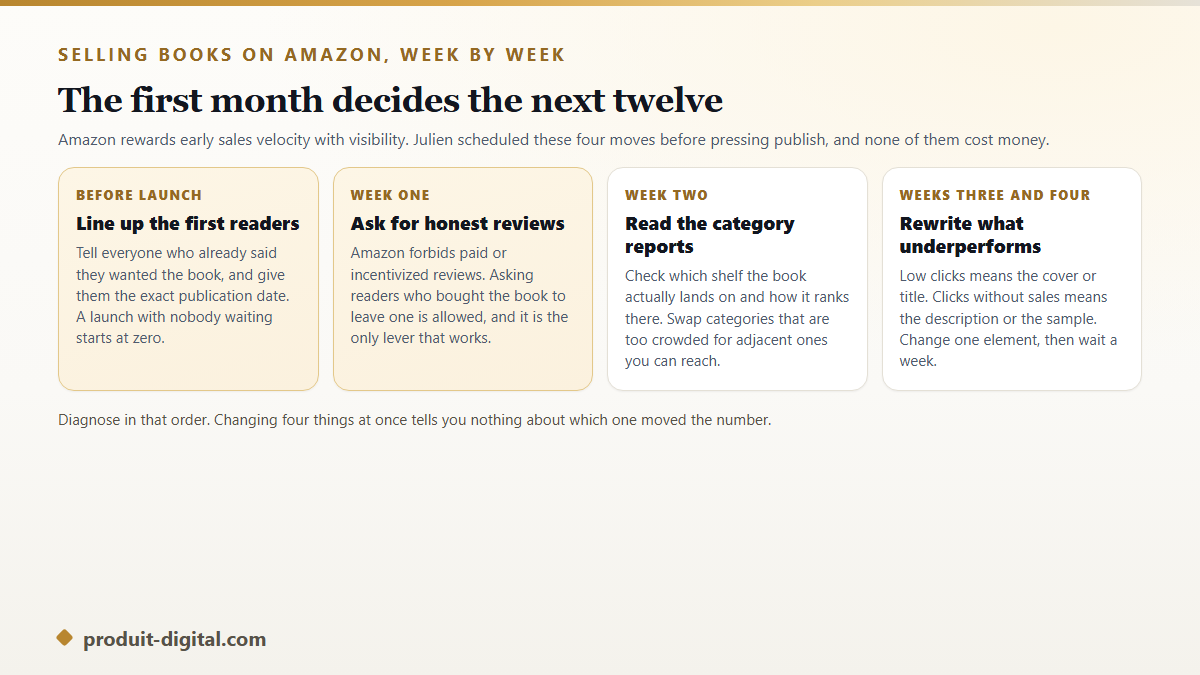
Reviews deserve a careful word. Amazon's community guidelines prohibit paid reviews, reviews exchanged between authors and reviews from close family, and the store removes them along with, sometimes, the account behind them. Asking readers who genuinely bought and read the book to leave an honest opinion is permitted and effective, and a line at the end of the book asking for exactly that outperforms every clever alternative.
KDP Select: the exclusivity trade
At some point in the dashboard Amazon offers to enroll your digital edition in KDP Select. The trade is explicit in its documentation: for a renewable ninety day term, the ebook may not be sold in digital form anywhere else, not on another store, not on your own site, not as a free PDF to your newsletter. Paper editions are untouched by the agreement and stay free to sell wherever you like.
In exchange the book enters Kindle Unlimited, where subscribers read it at no extra charge and the author is paid from a monthly global fund according to the number of pages actually read. Select also opens two promotional tools, a countdown discount and a limited free run, that are unavailable outside the program. For genre fiction with long books and subscriber heavy audiences the trade often pays. For nonfiction sold to a mailing list you already own, it usually does not, and what enrolling in KDP Select gives Amazon and gives back to you sets out how to run the comparison on your own numbers rather than on anecdotes.
Marketing that works on Amazon, and marketing that does not
Three levers reliably move a title. The first is an email list, even a small one, because it produces buyers on a chosen day. The second is Amazon's own advertising system, which places sponsored listings inside search results and can be started with a small daily cap while you learn what your book costs to sell. The third is a second book, since a series or a related title turns one reader into several sales.
What rarely works is broadcasting a purchase link to social feeds that never asked for a book. Announcements convert badly because the audience arrived for something else. Time spent instead on the listing text, on a genuinely good sample chapter and on the next title produces more than any posting schedule. Claire ran no advertising during her first six months and grew steadily by rewriting her description twice and adding a second title in the same series.
The mistakes that cost the most
Four errors account for most disappointing launches, and all four are cheap to avoid. Publishing without a cover designed for thumbnail size loses clicks that no amount of advertising recovers. Choosing categories by size rather than by fit hides the book on a shelf it will never climb. Setting a price by feel instead of by royalty band leaves money on every copy. Treating the listing as final on launch day removes the only lever that stays available forever.
The fifth mistake is quieter: publishing a book that is not finished. Amazon lets you replace files after publication, and readers who bought the earlier version keep it. A rushed release rarely gets a second chance with the readers who were most likely to recommend it.
A sixth deserves naming because it is invisible from inside the account. Authors regularly publish, watch nothing happen for two weeks, and conclude the book failed. Two weeks is not a verdict. Amazon's browse lists refresh slowly, reviews arrive after readers finish, and a title with three reviews behaves differently from the same title with fifteen. Give a launch a full quarter before you decide anything, and spend that quarter improving the page rather than refreshing the sales report.
Where the book itself comes from
Nothing above applies until a finished, well presented file exists. That is the stage where most projects die quietly, somewhere between an outline and a fourth chapter, and knowing how to sell books on Amazon compensates for it not at all. Manuscript, cover, illustrations if the book needs them, and a clean interior file are the real prerequisites.
On our side, the assisted path from an approved outline to an illustrated, print ready file exists so that stage stops taking a year. You keep control at every step, the outline is validated before a single chapter is written, and the export is a file KDP accepts as it is. What the platform covers, and what remains your judgment as an author, is laid out on the page presenting each stage between an outline and a book on sale.
Frequently asked questions
Is it free to sell books on Amazon?
Publishing through Kindle Direct Publishing costs nothing upfront. Amazon takes its share out of each sale instead: a royalty split on ebooks, and the printing cost plus its share on paper editions. Optional spending on covers, editing or advertising is your choice, not a requirement of the platform.
How long before my book is actually on sale?
According to Amazon's KDP documentation, a title generally becomes available within seventy two hours of publishing, and often faster for ebooks. Paper editions add a proof review step, which you can approve digitally or by ordering a physical copy. Plan for a few days rather than a few minutes when announcing a date.
Can I sell the same book on Amazon and somewhere else?
Yes, unless you enroll the digital edition in KDP Select, which requires exclusivity for the ebook during each ninety day term. Paper editions stay free to sell anywhere regardless. Many authors keep the paperback wide and test Select on the ebook for one term to compare the results.
Do I need an ISBN to sell a book on Amazon?
Not for the ebook, which Amazon identifies with its own ASIN. Paperbacks and hardcovers require one, and KDP supplies a free ISBN usable only with Amazon's print service. Authors planning bookshop distribution usually buy their own so the same edition can be printed elsewhere.
When does Amazon pay the royalties?
KDP pays monthly, roughly sixty days after the end of the month in which the sales happened, once your balance passes the minimum threshold for your payment method. Payment is made per marketplace, so a book selling in several countries produces several transfers rather than one.
Publish once, then improve the listing forever
The authors who do well on Amazon are rarely the ones who found a trick. They are the ones who finished a book worth recommending, described it honestly, placed it on a shelf where its readers already browse, and kept adjusting the page instead of waiting for the store to notice them. If the manuscript is the piece still missing, you can create your account and start building the book itself, and come back to the dashboard when there is a finished file to upload.