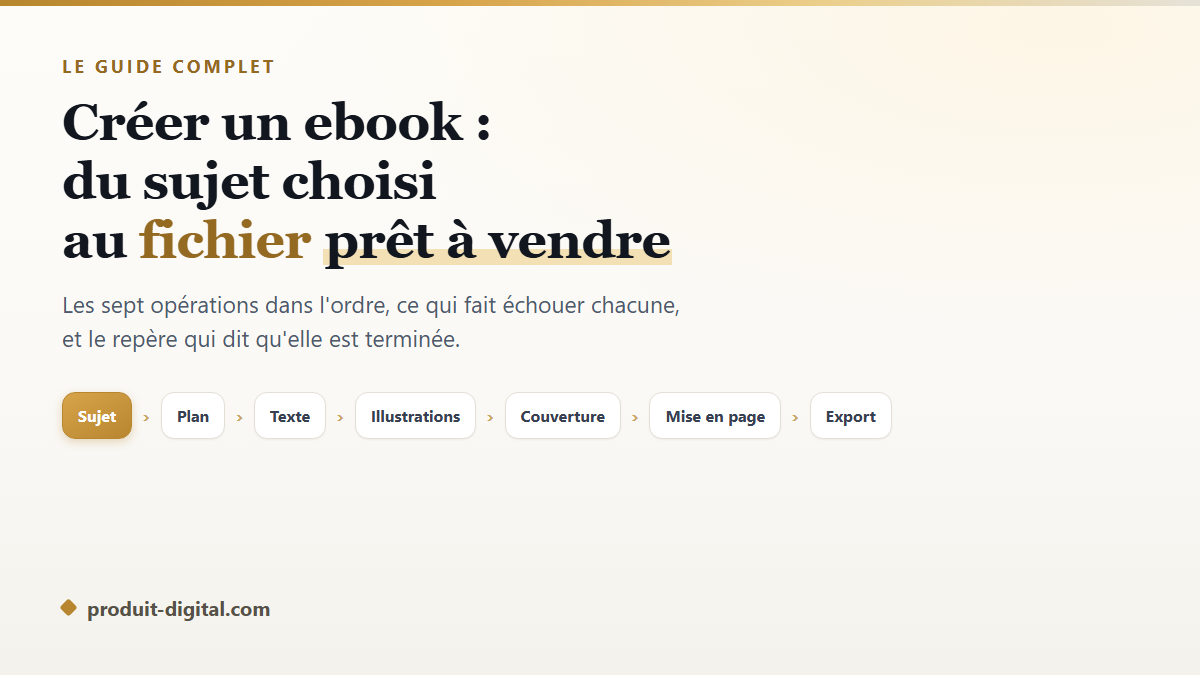
You already have the material: notes piling up, a method you have applied for years, the same answers repeated every week to the same questions. What stalls is the move to a finished object. Creating an ebook means running through seven very different operations, from choosing the topic to exporting the file, and each one can drag on when you tackle it without a marker. Abandoned projects rarely fail for lack of ideas: the outline was never settled, and the text started going in circles by chapter three.
This guide follows the whole chain, in the order it actually unfolds. For each step you get what makes it fail, the marker that tells you it is finished, and the time it takes. If your project is an illustrated book, building the outline through to export is described on the page explaining how an illustrated ebook is produced end to end.
The short answer
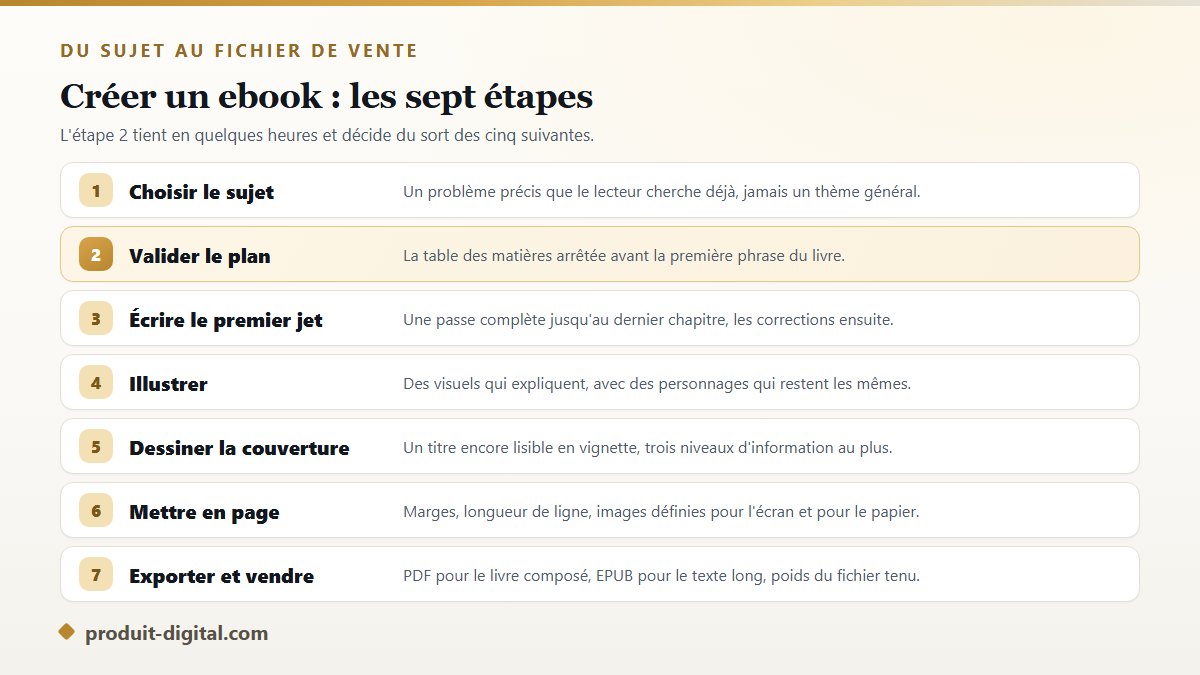
Creating an ebook comes down to seven operations: narrow down a specific problem rather than a theme, validate the outline chapter by chapter, write a complete first draft without correcting as you go, add the illustrations that actually explain something, design a cover that reads at thumbnail size, lay out the pages for screen and for print, export to the format your sales channel expects. PDF suits an illustrated guide, EPUB a long text read on an e-reader or a phone. Count on a few days for a short guide, a few weeks for a book with real depth. The outline is the only step you cannot fix afterwards.
What the word ebook actually covers
An ebook is a book delivered as a file. That definition covers two very different families, and confusing them is the first source of unpleasant surprises at export. In the first, the text flows and adapts to the screen: the type grows, lines reflow, pagination changes from one device to another. That is the principle behind EPUB, an open format whose specification has been published by the W3C since the IDPF joined the consortium in 2017.
The other family fixes the page once and for all. PDF keeps the exact position of every element, which allows careful composition, full-page illustrations, boxed sections and tables. In exchange it reads poorly on a small screen, where the reader has to zoom and scroll sideways. The choice between the two depends on the content of the book and on where it will be read, never on your own taste.
Step 1: choose a topic narrow enough to be found
The natural reflex is to take a broad theme so as to close no doors, and that is what kills the most projects. A book about nutrition goes up against thousands of titles without signaling to anyone that it was made for them. A book about what you can eat during the three weeks following digestive surgery has few competitors, an identifiable reader, and a precise moment when that reader is looking for an answer.
The test fits in one sentence you have to write down: put in words the question your buyer would type into a search engine, on the evening the problem is on their mind. As long as that sentence will not come, the topic is still too broad. This narrowing feels like shrinking the market, when in fact it makes the book recognizable among interchangeable titles.
Then check that the demand exists, which takes a few hours and saves several weeks. Search engine autocomplete, questions on specialist forums and the comments left under competing books give you the exact vocabulary of your future readers, the vocabulary of your title and your sales page. Established competition is rather a good sign: it proves an audience pays for this topic. Its absence is what should worry you.
Step 2: the outline decides everything else
The table of contents is the skeleton of the book, the one piece you cannot easily repair later. A shaky outline produces a text that repeats itself and loses its reader a third of the way in. A solid outline moves the writing along almost by itself, every chapter having a reason to exist and a place in the progression.
Write that outline as a journey: where the reader stands in the first chapter, where they need to stand by the last one, which steps take them there without detours. A chapter title that could apply to any book in the same field is still empty, so rewrite it. Under each title, note the three or four ideas to cover: that is what keeps the blank page away.
This constraint is the one we built into our production chain, where the outline is validated chapter by chapter before a single line is written. Fixing a structure at the outline stage takes a few minutes. Fixing it on a two hundred page manuscript costs several days, and is demoralizing enough that many people stop there.
Step 3: write the whole first draft
The rule that saves the most projects is to separate writing from correcting. Rereading every paragraph before moving on to the next produces a perfect opening followed by nothing. Make one complete pass, clumsy as it may be, all the way to the last chapter: you end up with a whole object to improve, which motivates in a way that a first chapter polished twelve times never does.
Set a pace rather than a deadline. A target of a thousand words per working day finishes a thirty thousand word guide in six weeks, missed days included. A global deadline along the lines of the book will be done by spring says nothing about what to do this morning, and slips painlessly. Write down the number of words produced each day: that record makes any lag visible right away.
Write for one person, not for an audience: pick someone specific, preferably real, and address them. Your examples become concrete, and the useless passages stand out by themselves because you can see that person getting bored reading them.
What length to aim for
No rule sets the length of an ebook, but working benchmarks exist. A practical guide that settles one specific problem often runs between eight thousand and fifteen thousand words, roughly forty typeset pages. A complete method book sits closer to thirty thousand or fifty thousand words. Beyond that, the share of readers who reach the end drops.
The criterion that decides is still the promise made by the title. A book padded out to look more serious betrays a reader who came for an answer, not for volume.
Step 4: the illustrations that carry the content
An image in an ebook either explains or decorates, and only the first function is worth the time it costs. A diagram showing how a process unfolds, a comparison between two situations, a labeled anatomy: each one replaces a whole paragraph and sticks better than it does. Mood photographs make the file heavier without adding anything.
If your book features characters who come back from one chapter to the next, a technical problem shows up fast: image generators redraw the character on every call, and the blond child on page four turns dark-haired on page nine. That is exactly what keeping the same character across every illustration in a book addresses, and it is what separates a coherent picture book from a series of unrelated images.
Set the resolution at production time, never after. An image meant for print needs around 300 dots per inch at the size where it will appear, against half that for screen use only. Enlarging an image that is too small recovers no detail: the blur is permanent.
Step 5: a cover is judged at thumbnail size
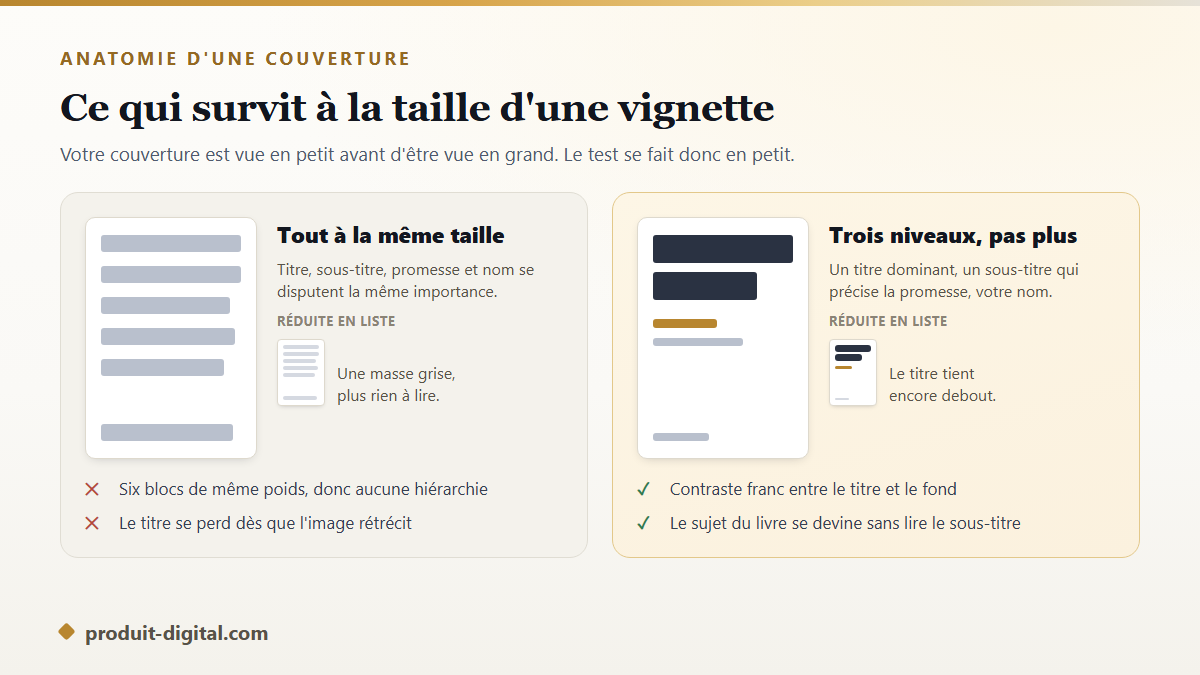
The cover is almost always seen before the full title, shrunk to the size of a stamp in a list of results, and that is the size at which it has to work. Reduce yours to two centimeters wide on your screen: if the title stays readable and the subject comes across, it is good. If not it needs redoing, whatever it looks like at full size.
Three levels of information are enough: the title, a short subtitle that spells out the promise, your name. Add strong contrast against the background, a plain typeface, an image that does not fight the text. Covers that fail share the same flaw, too many elements at the same size, so no hierarchy and nothing readable once it is scaled down.
Look at the first twenty covers in your category on a large online bookstore. You will find shared visual codes, which are neither to be copied nor ignored: belong to the family, stand out by one detail. Our book cover generator works from the actual content of the manuscript, which avoids generic covers with no connection to the text.
Step 6: layout, for the screen as well as for print
Comfortable text comes down to a handful of settings: generous margins, a large enough type size, a reasonable line length. Classic typesetting aims for sixty to eighty characters per line. Beyond that, the eye loses the start of the next line; below it, reading becomes choppy. This setting changes perceived comfort more than the choice of typeface does.
Plan for print even if you do not expect to print. A file composed with a sufficient inner margin and properly defined images goes to a print on demand service without retouching, which opens a second audience without doubling the work. These margin and bleed constraints cost nothing while you are typesetting, and cannot be recovered afterwards.
Finally, keep an eye on the file size. A PDF of several dozen megabytes often fails to download on an average connection, and uncompressed images are almost always the cause. We gathered these output constraints into a PDF export ready to publish, and the free PDF tools on the site let you take an existing file and make it lighter, number it or add a watermark.
PDF or EPUB: how to decide
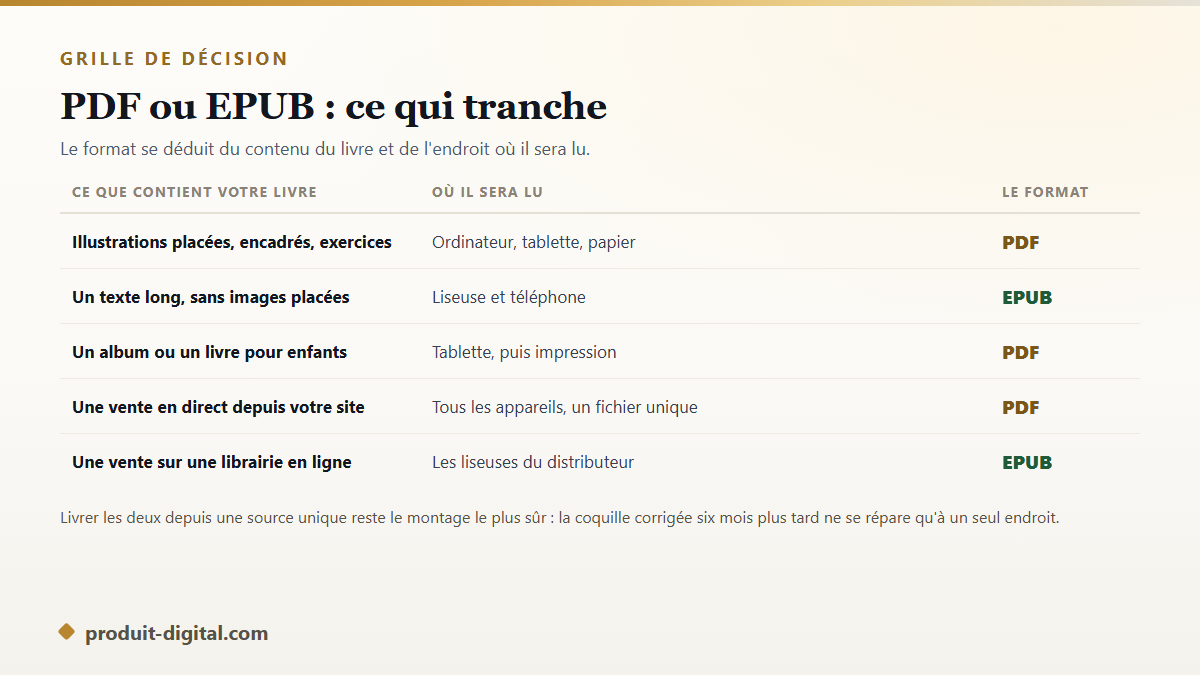
The decision rests on three questions: does your book have a layout that must be respected to the millimeter, on what device will it be read, through which channel will it be sold. Here is what each format brings.
- Features. PDF freezes the composition, handles columns, boxed sections and illustrations placed exactly where you want them. EPUB reflows the text, lets the reader set the character size and offers a native clickable table of contents.
- Ease of production. PDF exports from any word processor. EPUB requires a cleanly structured document, with real heading styles, failing which distributors will reject it.
- Use cases. Illustrated book, guide with exercises, document meant for print: PDF. Novel, essay, long text with no complex layout, sale through online bookstores: EPUB.
- Languages and characters. Both handle non-Latin alphabets, but EPUB depends on the fonts present on the reader device, unless you embed your own.
- Free option available. Yes on both sides: a free word processor exports to PDF, and free converters produce an acceptable EPUB from a well structured document.
Many authors ship both, which closes the debate. The buyer who orders directly receives the typeset PDF, the one who goes through an online bookstore receives the EPUB. Producing both from a single source saves you from maintaining two versions of the text, the only setup that still holds up when you fix a typo six months after release.
Rights, ISBN and legal deposit
Your text belongs to you the moment it is written. French intellectual property law provides that an author holds a right over their work by the sole fact of its creation, with no registration or prior formality. What can be missing in a dispute is proof of date, which comes from a deposit with a trusted third party or a timestamped copy kept separately.
The ISBN identifies an edition, not a work. In France, AFNIL assigns these numbers to publishers and self-published authors alike, and each format of the same book gets its own: the print version and the digital version do not share one. It is not required to sell a file from your own site, but online bookstores and libraries ask for one. According to the Amazon Kindle Direct Publishing documentation, the platform assigns its own identifier free of charge to ebooks published there, without requiring an ISBN.
Legal deposit is a separate obligation, set out in the French heritage code for documents distributed in France. The Bibliotheque nationale de France is the depository body for books, and its information pages spell out the cases in which a digital document is subject to it. The rules vary from one country to another: the national library of yours is the only body able to answer for your situation.
Creating an ebook without spending six months on it
The chain described here is the same for everyone, but the time spent at each station varies with the tooling. An author who writes in a word processor, orders the cover from a designer, typesets in layout software and then converts with a fourth tool spends as many hours on logistics as on writing. Every move from one tool to the next introduces rework: lost styles, images to reposition, a table of contents to rebuild.
Bringing the steps together into a single chain removes that rework, and that is the approach taken by Produit Digital. The outline, the text, the illustrations, the cover and the export live in the same place, and the final file comes out with no intermediate transfer. You stay in control throughout, since the outline is validated before the writing starts and the text is edited chapter by chapter. The plans and the way credits work are set out on the pricing page.
The mistakes that cost the most time
They come back with regularity among authors publishing their first book. Knowing them does not spare you from making them, but it lets you spot them before they cost you weeks.
- Starting to write without a validated outline. The text heads off in several directions, and the rewrite takes longer than the original draft.
- Correcting while writing. The first chapter reaches perfection, the fourth never exists.
- Polishing the layout before the text is done. Every change to the content undoes the typesetting work.
- Treating the cover as a final decoration. It decides a large share of the clicks and it is tested at thumbnail size.
- Choosing the file format at the end. A book designed for PDF converts poorly to EPUB, and the reverse is true as well. The question comes up when you write the outline.
- Waiting for perfection to publish. A file is updated after release, and buyers receive the corrected version. A book that is never published teaches its author nothing.
Frequently asked questions
Do you need to be a writer to create an ebook?
You need to be able to explain, which is not the same skill as literary style. A practical guide is judged on the clarity of its progression and the precision of its examples. Write the way you would explain the thing to someone sitting across from you, then read it aloud and cut whatever snags. A read-through by someone outside the subject spots in an hour the places where you assumed knowledge the reader does not have.
How long does it take to create an ebook?
A short, focused guide takes a few days of actual work, an illustrated book with real depth more like a few weeks. Those durations assume a validated outline at the start: without one, the same amount of content takes two to three times longer, because a good part of the text ends up in the bin. Layout and export weigh one day when the chain is properly tooled, more if you have to move from one piece of software to another.
Can you create an ebook for free?
Yes for the basic production: a free word processor writes the manuscript and exports a decent PDF. The limits show up on original illustrations, the cover and the visual consistency of an illustrated book, which call for time, a skill or a paid tool. So the question is not whether it is possible, but which share of the work you carry yourself.
What format do you need to sell on Amazon?
According to the Amazon Kindle Direct Publishing documentation, a manuscript is uploaded in EPUB, in DOCX or in the format produced by the in-house creation tool of the platform, which then handles the conversion for its e-readers. EPUB remains the safest upload for a long text. PDF is accepted, but the platform advises against it for ebooks: the fixed page reads poorly on a small screen.
Do you need an ISBN to sell your ebook?
Not for a direct sale from your own site: a file is sold and delivered without a standardized identifier. The ISBN becomes necessary as soon as you go through booksellers, distributors or libraries, which catalog by that number. AFNIL issues it in France, each format requiring its own. The equivalent bodies differ from one country to another, so check with the national agency of yours.
How do you protect an ebook against copying?
No technical protection is fully reliable on a file meant to be read. The reasonable measures are personalizing each copy with the name of the buyer, adding a discreet watermark and limiting the number of downloads. The best defense is still updating: a copy in circulation goes out of date, while the legitimate buyer receives the current version.
The hardest part of an ebook is neither writing it nor laying it out: it is choosing a problem specific enough for a reader to recognize themselves in it, then going through the whole chain without stopping at chapter three. If that problem is already in your mind, the next step is the outline, and it can be done today. Creating your account is enough to lay down the structure of the book and see the first chapter before committing your weeks to it.